Key Takeaways
- Quizlet’s free version lets you study flashcards, but building cards from your own vocabulary list still requires manual input or a formatted import file — and the cards contain no readings, memory hooks, or example sentences.
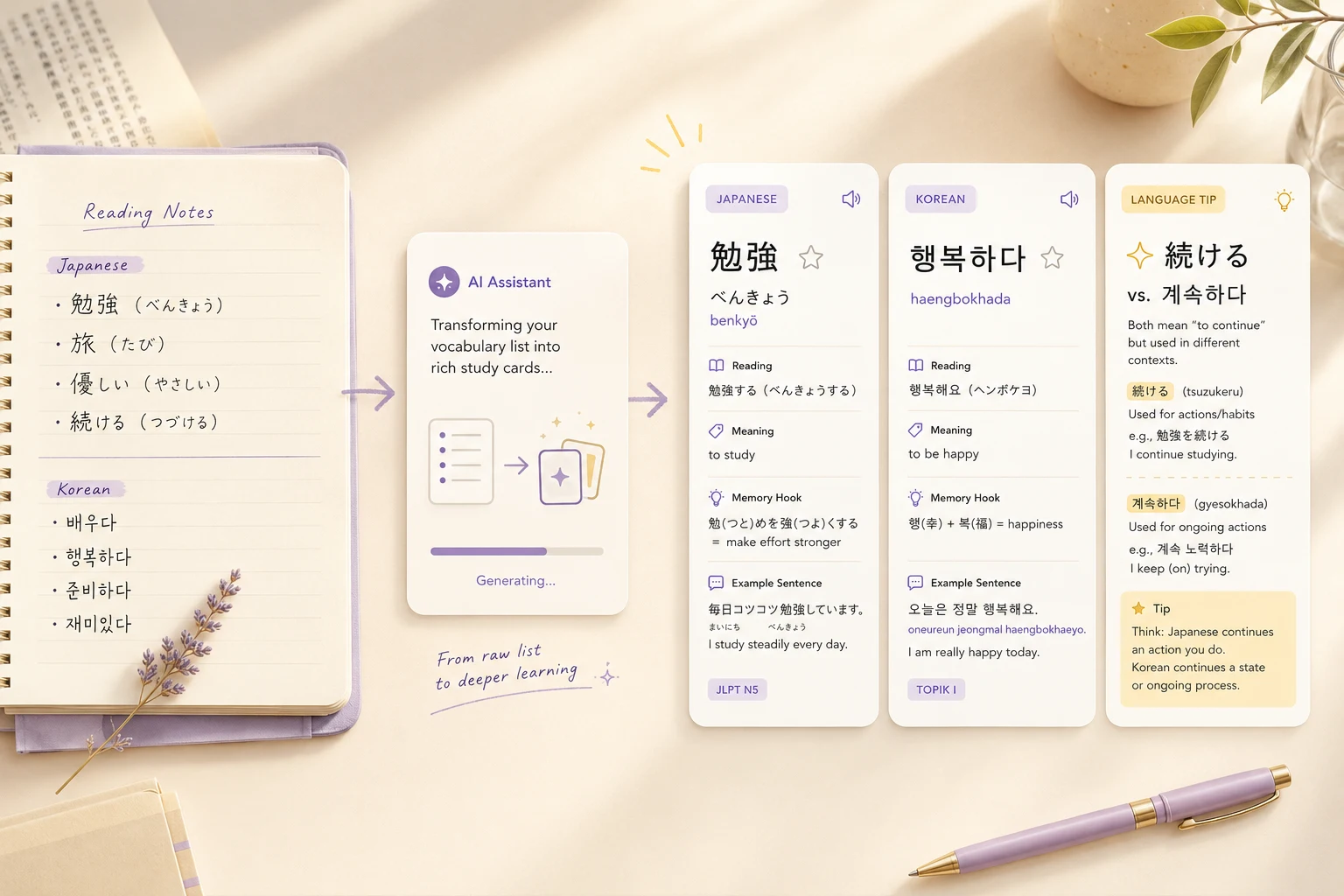
- Gemini and ChatGPT can generate flashcards from any word list in seconds, including hiragana readings, English sound-alike memory hooks, and natural example sentences, all for free.
- For long-term review, pair AI-generated cards with Anki or Knowt. Use AI to make the cards, then use your preferred tool to study them.
The fastest free Quizlet alternative is not another flashcard app.
Gemini and ChatGPT can generate a full flashcard deck from any word list in under a minute — with readings, memory hooks, and example sentences already included. No extra flashcard app, no manual card-by-card input, and no spreadsheet cleanup.
I study Japanese and Korean without a teacher or a formal course. Most of my vocabulary comes from dramas and news articles. Reading authentic content in Japanese used to mean constant tab-switching — article in one tab, dictionary in another, and by the time I looked up the third word I had lost the sentence. I now use Immersive Translate as a browser extension that shows an English translation directly under each original paragraph, so I can read without stopping. When a word catches my eye, I add it to my list and keep going.
The problem came next: turning that list into flashcards. When I tried using Quizlet, the slowest part was always making the cards — and what I got was just a word and a definition. No reading. No example sentence. Nothing to help me actually remember.
What Is the Best Free Quizlet Alternative?
The best free Quizlet alternative depends on what part of the process you find most frustrating.
| Tool | Best For | Pros | Watch Out |
|---|---|---|---|
| Gemini ⭐⭐⭐⭐⭐ | Making flashcards fast | Memory hooks, readings, quiz, matching game | 18+ only; availability varies by region |
| ChatGPT ⭐⭐⭐⭐ | Importing cards into Anki or Quizlet | Clean TSV output, flexible format | No flashcard UI |
| Claude ⭐⭐⭐⭐ | Custom quizzes with explanations | Kanji breakdown, fully customizable | Needs more setup; best for quizzes, not flashcards |
| NotebookLM ⭐⭐⭐⭐ | Extracting flashcards from articles | Source-based cards, in-context breakdowns | No SRS scheduling |
| Knowt ⭐⭐⭐⭐ | Studying with more free modes | SRS, fill-in-blank, AI card generation free | Free AI has monthly limits; ads on free plan |
| Quizlet ⭐⭐⭐ | Finding existing decks | Huge shared library | Learn mode capped on free; Plus from $35.99/yr |
| Anki ⭐⭐⭐⭐⭐ | Long-term spaced repetition | Best SRS algorithm, free on desktop + Android | iOS app is $24.99 one-time; steep learning curve |
Tool features and free tier limits can change — check each tool’s current plan before committing to a workflow.
Most alternatives ask you to move to another platform and start over. If your main problem is making the cards in the first place, AI tools solve that without any extra app.
Why I Stopped Looking for Another Quizlet Clone
Building flashcards manually is the slowest part of vocabulary study.
When I tested Quizlet’s free version, creating a set still took real work.
I had two choices:
- Type each term and definition one by one
- Prepare my word list in a specific tab-separated format before importing
The import worked. But the hard part was still mine: decide which words to study, look up the readings, write the definitions, and format everything — before a single card appeared.
The cards themselves were minimal. Quizlet stores what you put in. That means no reading for Japanese kanji, no example sentence, no memory hook. Just the word and a definition.
Quizlet was also built for classroom use. The sharing options are Google Classroom, Remind, and Microsoft Teams. As a self-taught learner, none of those apply. And while the free version still lets you create flashcard sets, the Learn mode that actually drives retention — spaced repetition with multiple choice and recall questions — is now capped to a limited number of rounds per session on the free plan. Several features that were free before 2024 have moved behind Quizlet Plus, which runs $35.99 per year ($2.99/month) billed annually, or $7.99 per month on a rolling plan. AI features like Magic Notes and Q-Chat require Plus.
Gemini: The Fastest Free Way to Make Flashcards with AI
Gemini is currently one of the most capable free tools for language learners who want to make flashcards directly from a word list.
Paste your vocabulary into Gemini with a prompt, and it can generate an interactive flashcard deck in the Canvas panel within seconds. Each card has a front and a back. You can shuffle the deck, get hints, use text-to-speech to hear the pronunciation, and track your learning progress.
No download required, and no extra platform to sign up for. You need a Google account. According to Google’s official Help Center, quizzes, flashcards, and study guides in Gemini are available to users 18 and older — Guided Learning is available to all ages. The feature is available globally where the Gemini app is supported, but the exact interface can vary by account type. If you use a work or school Google account, some Canvas sharing features may not be available.
Copy-and-Paste AI Flashcard Prompts
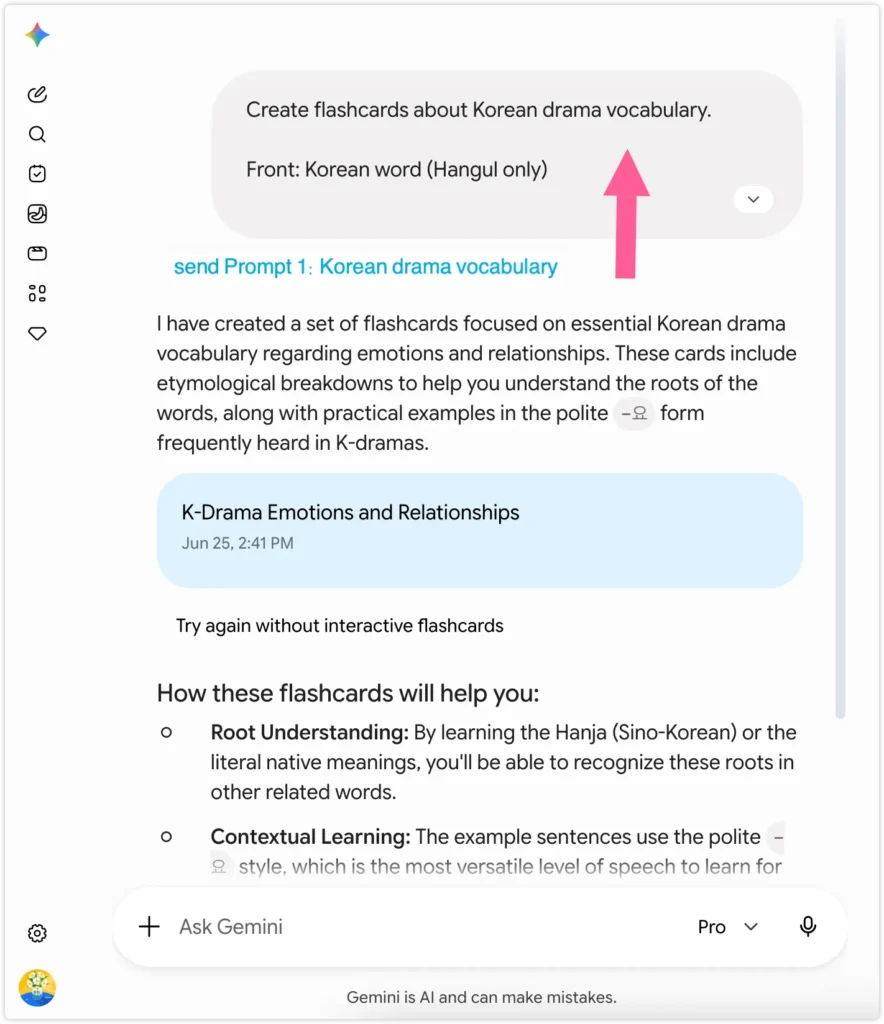
Prompt 1: Korean drama vocabulary
Best for: Korean words from dramas, shows, or real-life situations
Use this when: You have a list of Korean words and want cards with pronunciation, meaning, and a memory hook
Create flashcards about Korean drama vocabulary.

Front: Korean word (Hangul only)

Back:
- Romanization
- English meaning
- Etymology: Is this a Sino-Korean word (한자어)? If so, show the
  Chinese characters and meaning of each character. Is it a native
  Korean word (고유어) or loanword (외래어)? One sentence explaining
  the word's origin and why it means what it means.
- One example sentence in Korean (polite -요 form) with English
  translation

Topic: emotions and relationships (words you might hear in a Korean drama)
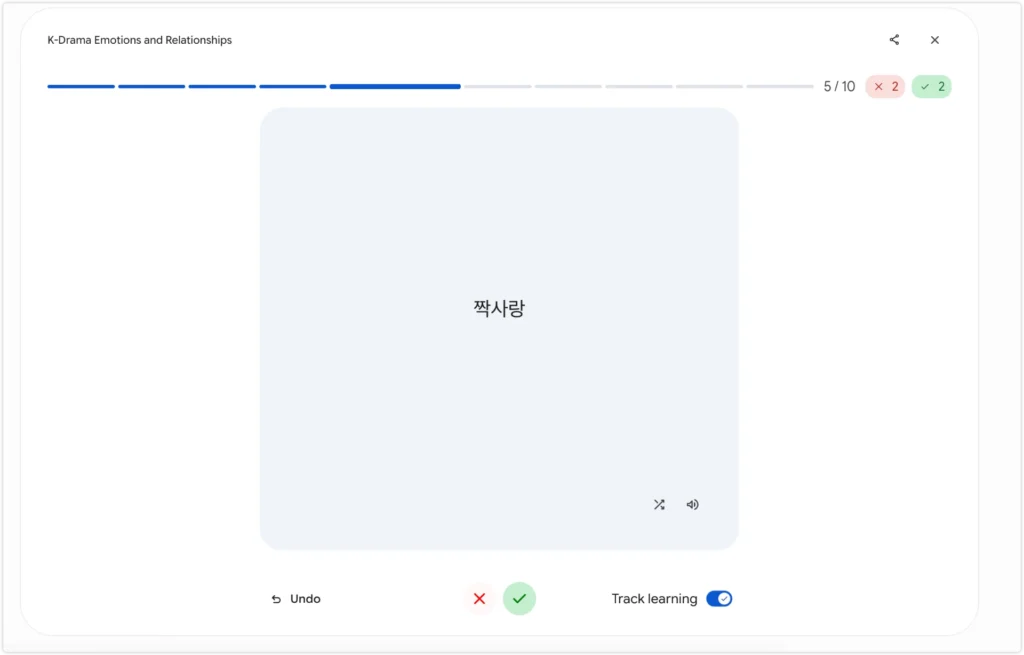
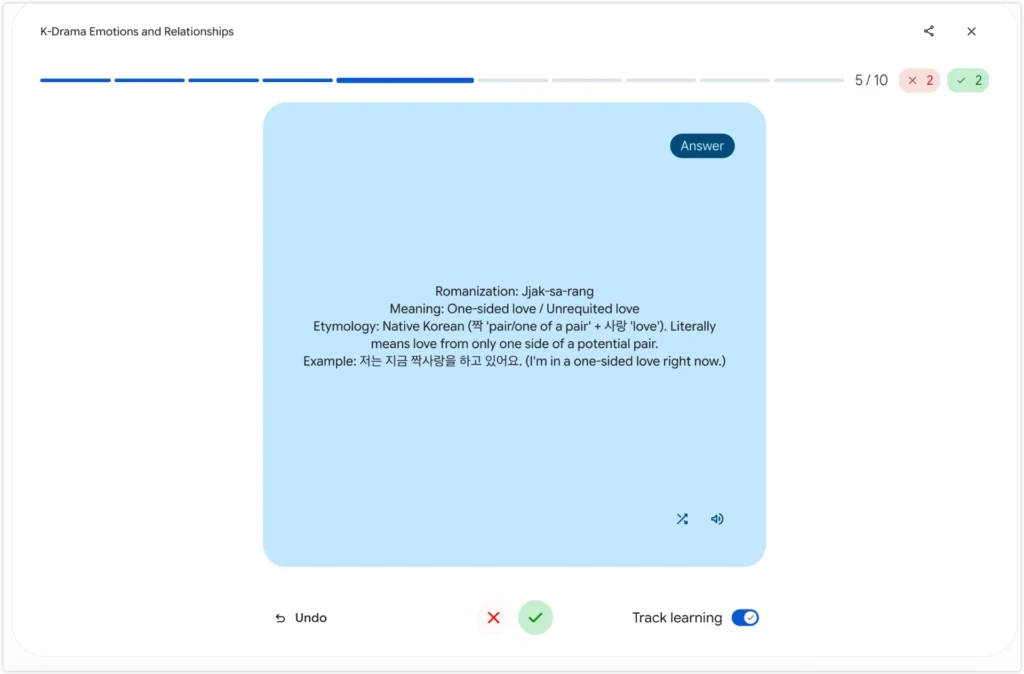
If you are just starting out with Korean vocabulary and wondering how long the journey takes, the how long it takes to learn Korean guide covers what to expect at each stage of self-study.
Prompt 2: Japanese vocabulary with readings
Best for: Any Japanese text — news articles, drama scripts, company pages, or your own word list
Use this when: You want full cards with readings, example sentences, and kanji breakdowns
One tip: Gemini cannot read URLs. Copy and paste the Japanese text directly — either the full article or just the sentences you want to focus on — then send it with this prompt.
Create flashcards about this Japanese vocabulary list.

Front: Japanese word (kanji/kana as shown) followed by part of speech in parentheses. Example: 役作り (n.) / 指摘する (v.) / 繊細 (adj.)

Back:
- Reading (hiragana/romaji)
- English meaning
- One example sentence in natural Japanese
- Reading line: list only the kanji words from the sentence with their readings. Format: 事故 (じこ) / 相次ぐ (あいつぐ) / 発生 (はっせい)
- English translation

[paste your word list or full article here]
The memory hook is the part no competing tool offers — but what makes this workflow genuinely powerful is the source material.
You are not limited to pre-made word lists. Any Japanese text works.
I copied this article about Matsumoto Jun’s final Arashi concert directly into Gemini with Prompt 2 above — no word list, no preparation.
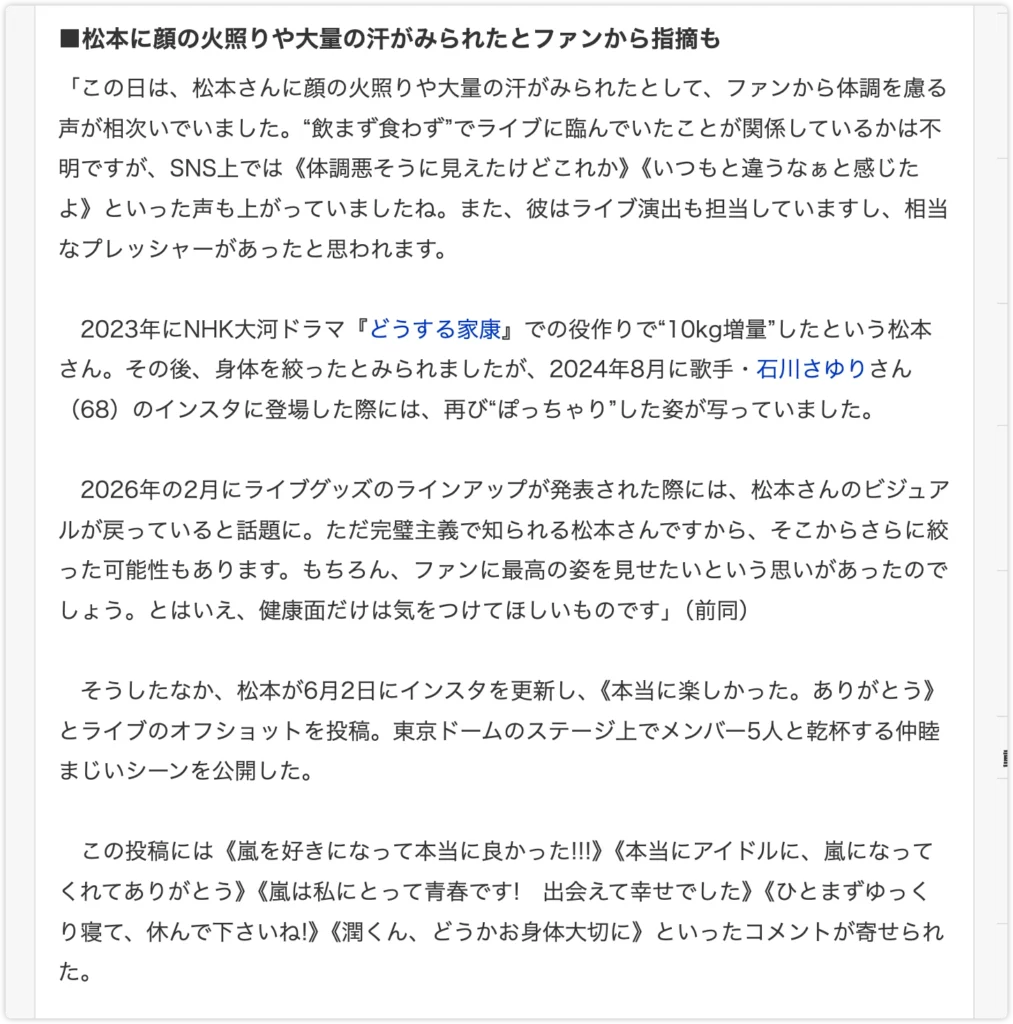
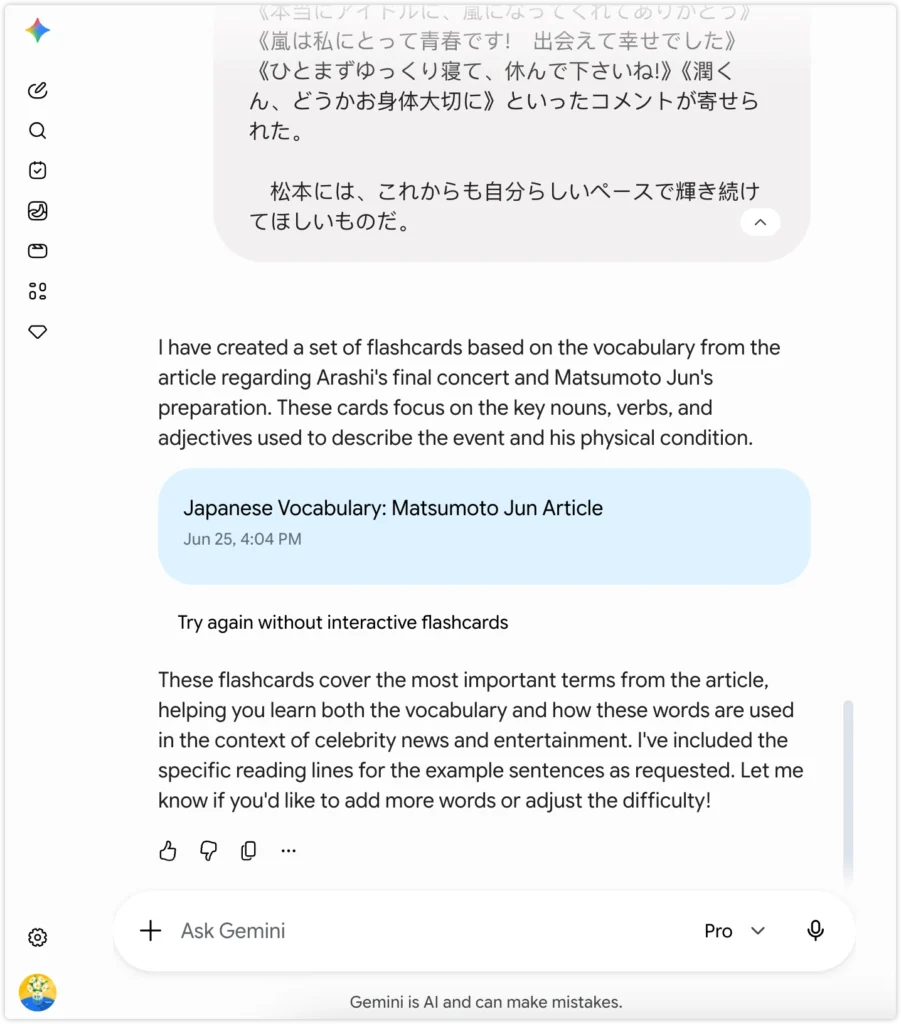
Within seconds it pulled out 披露する、指摘、体調 and nine other terms, generated a full deck with readings, part of speech, example sentences, and kanji breakdowns for every card.
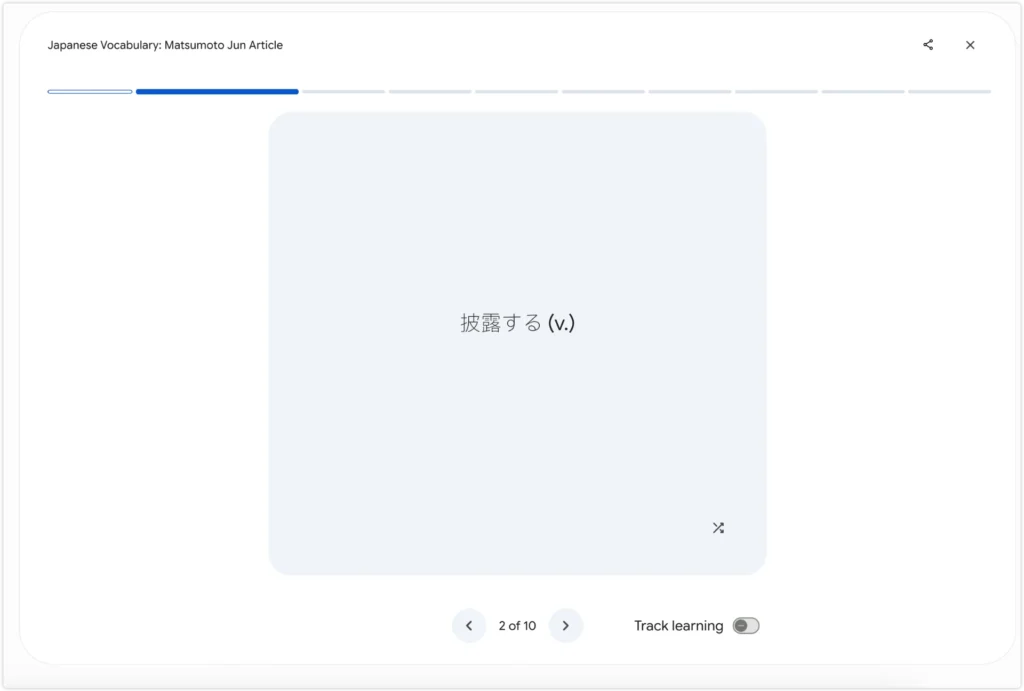
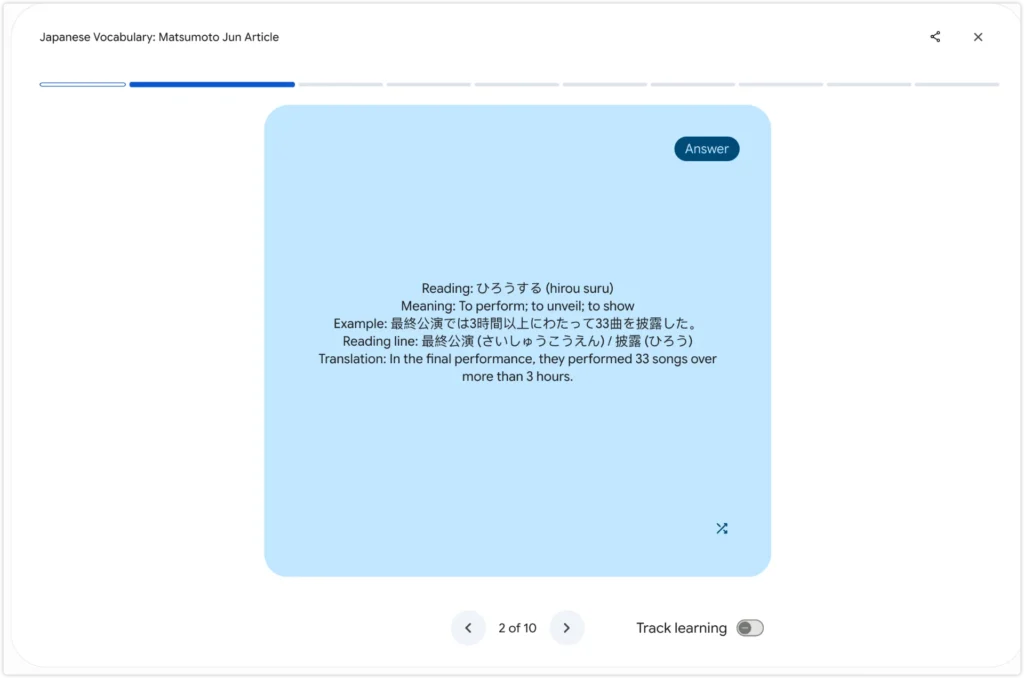
The front shows the word and part of speech. Flip it and you get the reading, meaning, a fresh example sentence, and a reading line so you never get stuck on kanji pronunciation.
Drama scripts, NHK articles, celebrity news, company pages — if it is written in Japanese, paste it in and you have a study deck in under a minute.
This approach works well for everyday vocabulary too. If you are building a base of common Japanese phrases before moving into news vocabulary, start there first.
Prompt 3: JLPT vocabulary quiz
Best for: Learners who want to drill vocab at their level without preparing a word list
Use this when: You want to test yourself on JLPT vocabulary — just change the level and Gemini picks the words
Create a JLPT vocabulary quiz for me.

Level: N3
Questions: 10

For each question, write a natural Japanese sentence with the target word marked in 【】brackets. Give me 4 hiragana reading options to choose from.

After I answer, show whether correct or incorrect, then show:
- Meaning in English
- Part of speech
- Common collocations (2-3 examples with hiragana reading for non-obvious kanji and English translation. Format: 複雑な気持ち (きもち) — complicated feelings)
- One pronunciation tip: point out the specific sound learners commonly confuse (e.g. voiced vs unvoiced, long vs short vowel)

Show score and progress.
Change N3 to N5, N4, N2, or N1 to match your current study level.
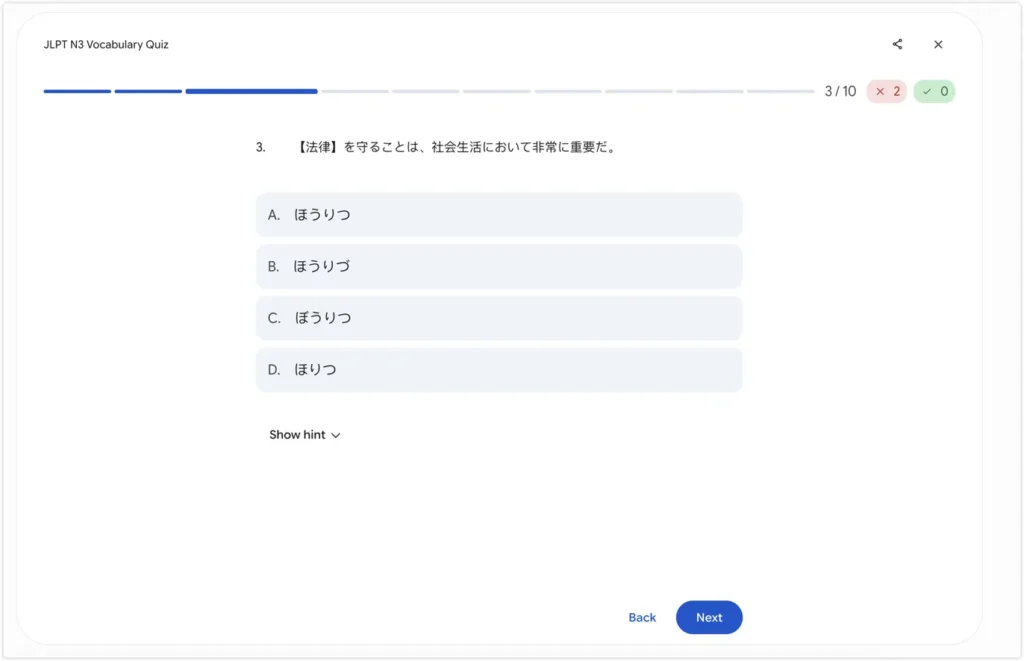
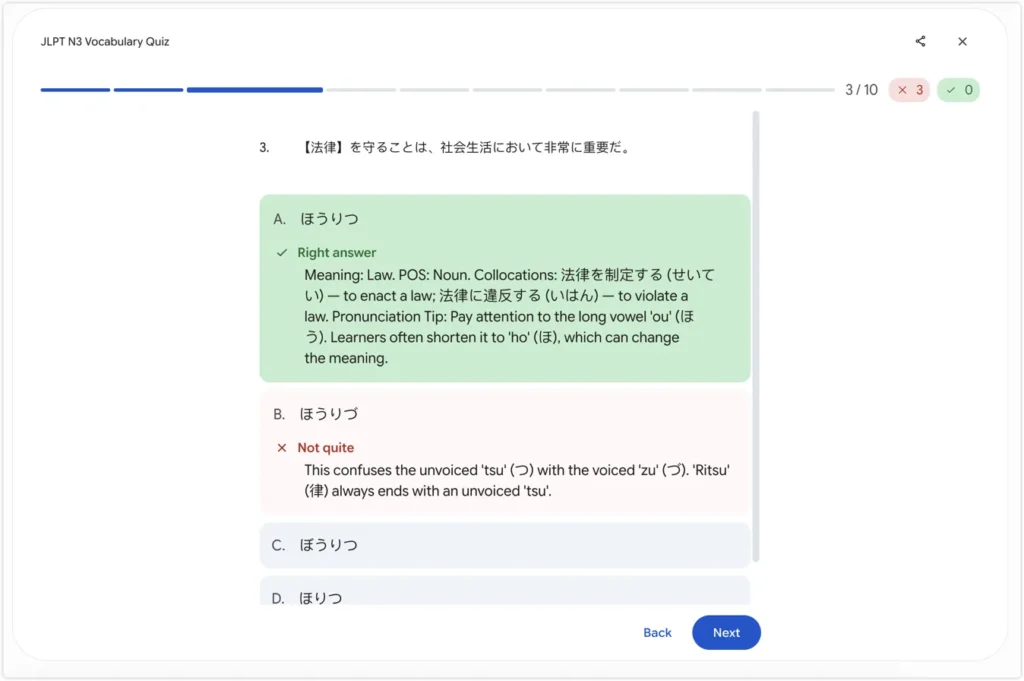
Prompt 4: JLPT grammar quiz
Best for: Learners who want to practice grammar patterns without doing paper drills
Use this when: You want to test whether you are using the right grammar form in context — great for N4 and above
Create a JLPT grammar quiz for me.

Level: N3
Questions: 10

For each question, write a natural Japanese sentence with one word or phrase
missing, marked as 【___】. Give me 4 grammar options to choose from.

After I answer, show each section as a separate paragraph with its emoji.
Do not use \n or any escape characters.

✅ Correct! / ❌ Incorrect. The answer is [correct answer].

📖 [English translation of the sentence]

📌 [Grammar rule in English, 2 sentences max]

⚡ [〜A vs 〜B: one sentence explaining the key difference]

💬 [collocation 1 using the target grammar point] — [English meaning]
💬 [collocation 2 using the target grammar point] — [English meaning]
💬 [collocation 3 using the target grammar point] — [English meaning]

🏆 Score: X/10 · Question Y of 10

Rules:
- All explanations in English only, never Japanese
- Never use romaji anywhere, including in vs confusion explanations
- Collocations MUST use the target grammar point, not vocabulary from the sentence
  ✓ For 〜やすい: 読みやすい — easy to read / 覚えやすい(おぼえやすい)— easy to remember
  ✓ For 〜たばかり: 買ったばかり — just bought / 始めたばかり — just started
- Add hiragana for any verb or noun with a non-obvious reading,
  including cases like 間(ま)に合う、考(かんが)える etc.
- Never add readings for common kanji like 書く、食べる、使う、子供、冬 etc.
- One question at a time, wait for my answer before showing the explanation
Each answer comes with a grammar explanation, a common confusion pair, and three collocations using the same pattern — so you are not just checking right or wrong, you are actually learning why.
Change N3 to N5, N4, N2, or N1 to match your current study level. You can also upload a photo of a past paper and ask Gemini to turn it into an interactive quiz — no typing required.
ChatGPT: Generate Flashcards You Can Import Anywhere
ChatGPT is better suited for learners who want to import cards into another tool rather than study directly inside ChatGPT.
ChatGPT’s free tier can generate flashcard content in any format you specify — including tab-separated text that imports directly into Quizlet or Anki. It does not have a native interactive flashcard interface like Gemini’s Canvas panel, but the output is clean and flexible.
Prompt 5: Quizlet or Anki import format (TSV)
Best for: Learners who already use Quizlet or Anki and want to add new cards fast
Use this when: You have a word list and want clean output you can paste directly into an import screen
Convert this vocabulary list into tab-separated flashcard format.

Each line:
Japanese word only [TAB] Hiragana reading + part of speech + English meaning

Do not put the reading on the front side.
The front side should show only the Japanese word.
The back side should show the reading, part of speech, and meaning.

Use this back-side format:
hiragana|part of speech|English meaning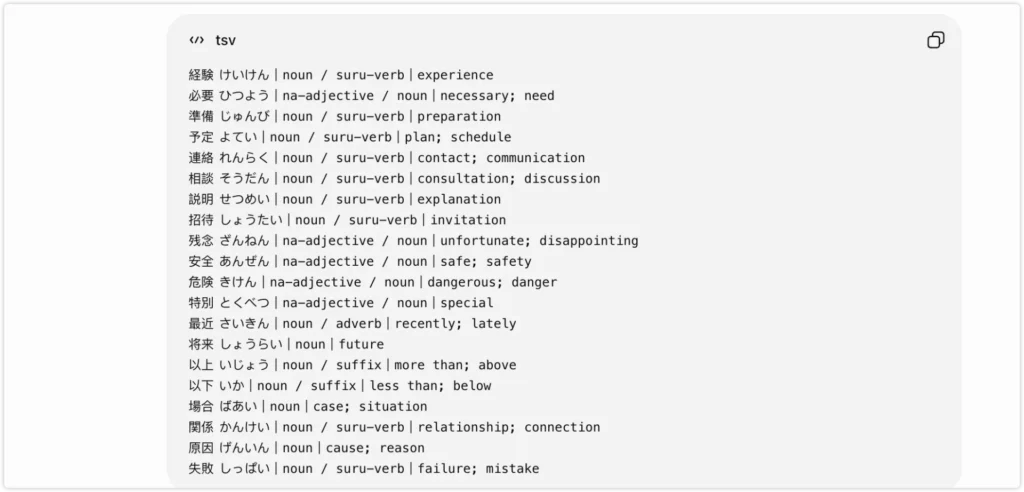
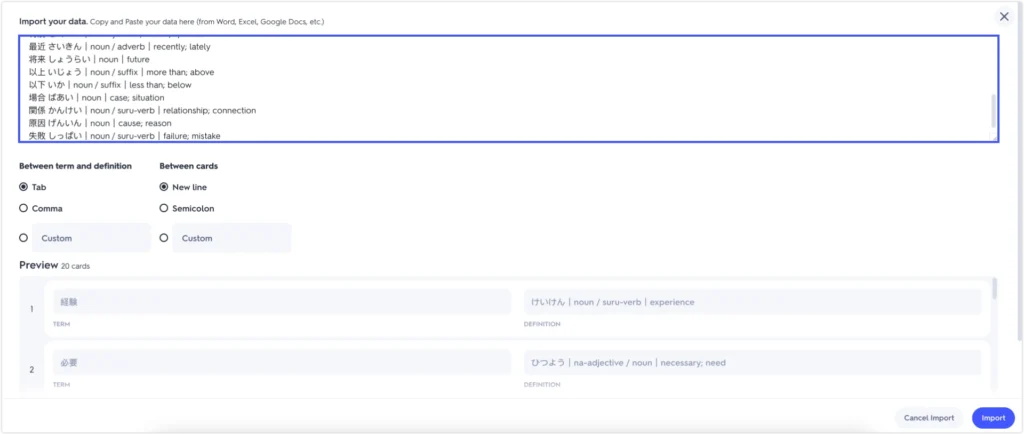
To import into Quizlet: Go to Create → Import → paste the output → set the separator to Tab.
To import into Anki: Go to File → Import → paste as a .txt file → set the field separator to Tab.
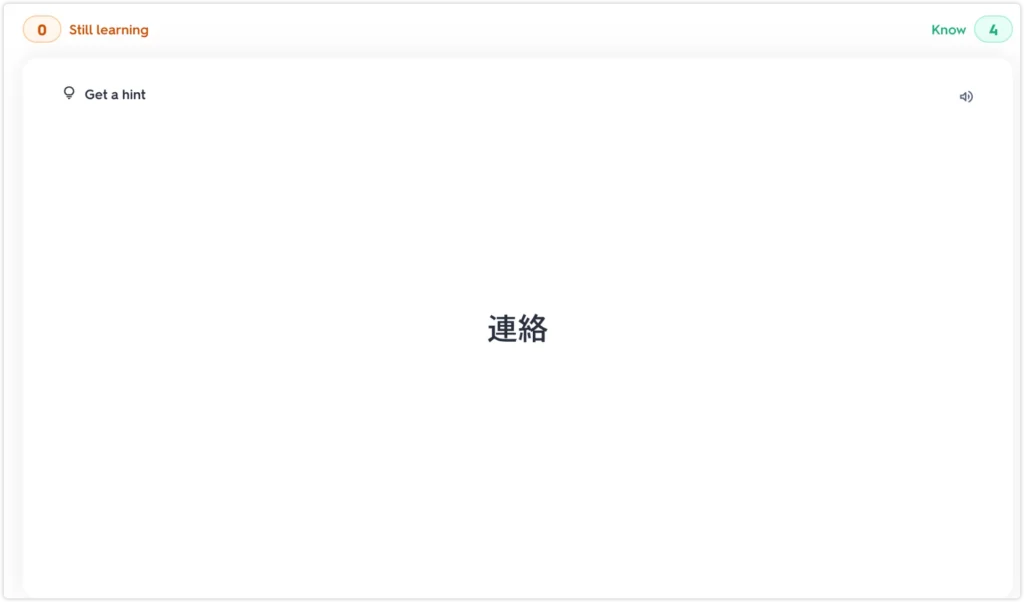
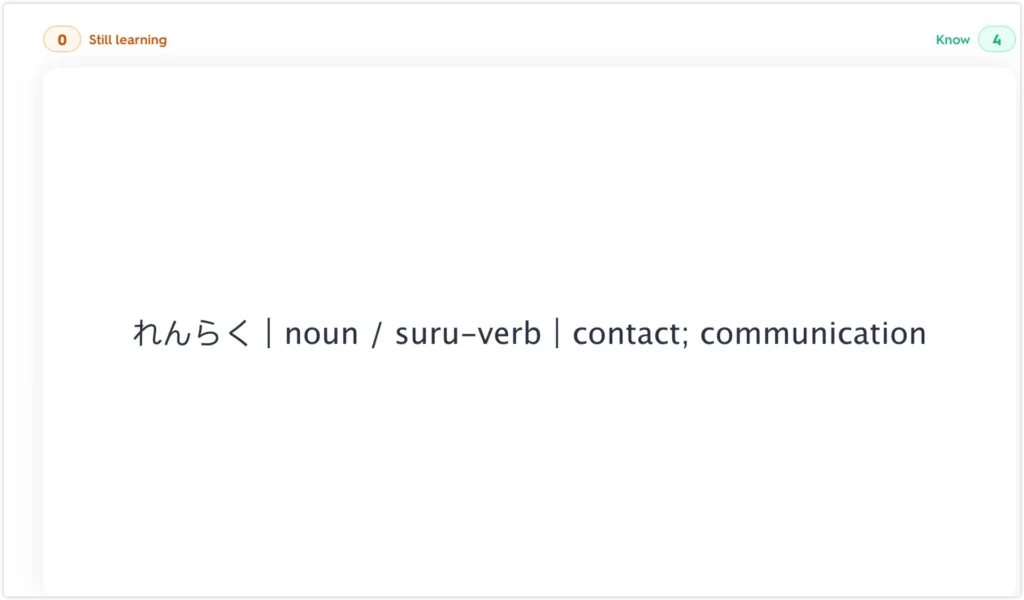
ChatGPT also has a Study Mode that walks you through material with guided questions, which works well for checking your own understanding after building a deck.
Claude: Build a Custom Vocabulary Quiz with No Coding
Claude is not a flashcard app. It is the most customizable option for learners who want a quiz built around their exact vocabulary, with detailed explanations after every answer.
Claude does not have a native flashcard interface like Gemini’s Canvas panel. Instead, you describe what you want, and Claude builds a fully interactive quiz as an HTML file you can open in any browser. No coding knowledge required. You just tell it what the quiz should look like.
Prompt 6: Build a quiz from your own word list
Best for: Learners who have vocabulary from dramas, news articles, or textbooks and want an instant interactive quiz
Use this when: You have a word list ready — Japanese or Korean both work
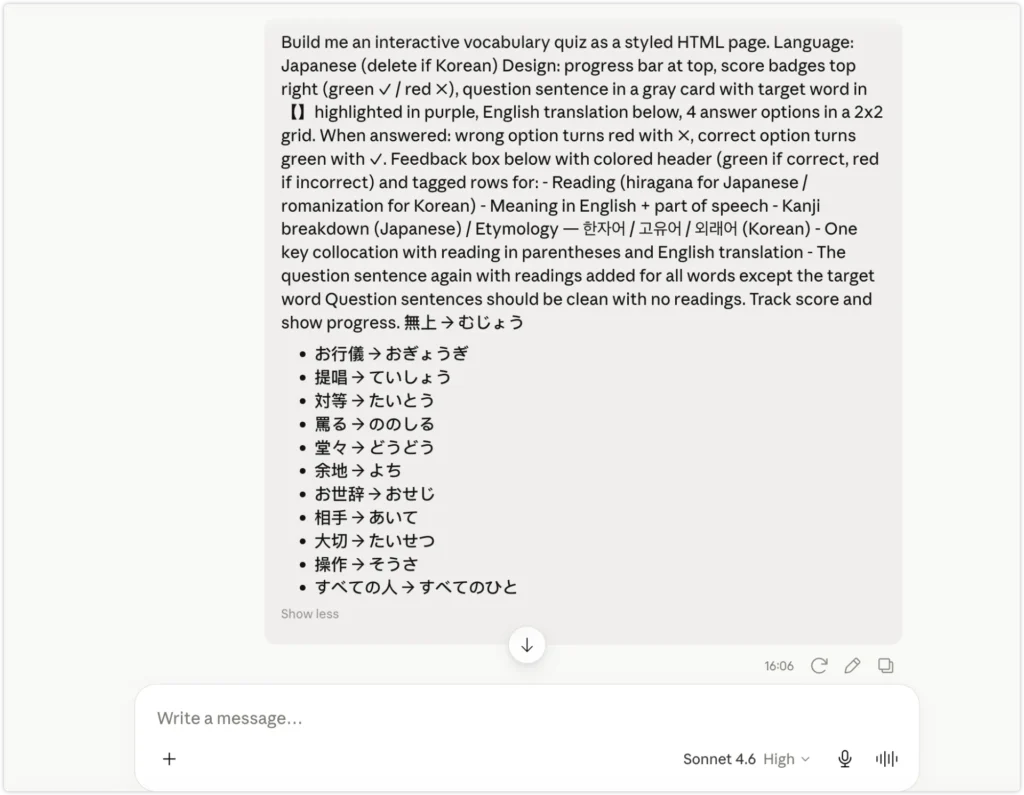
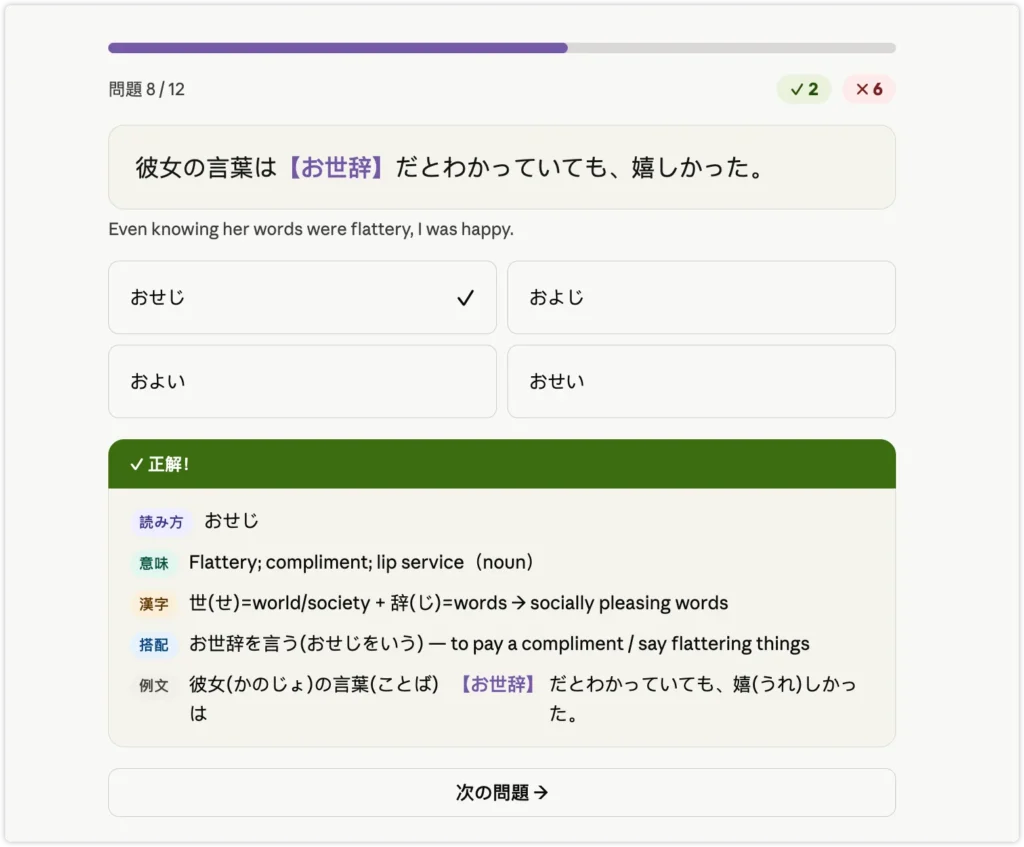
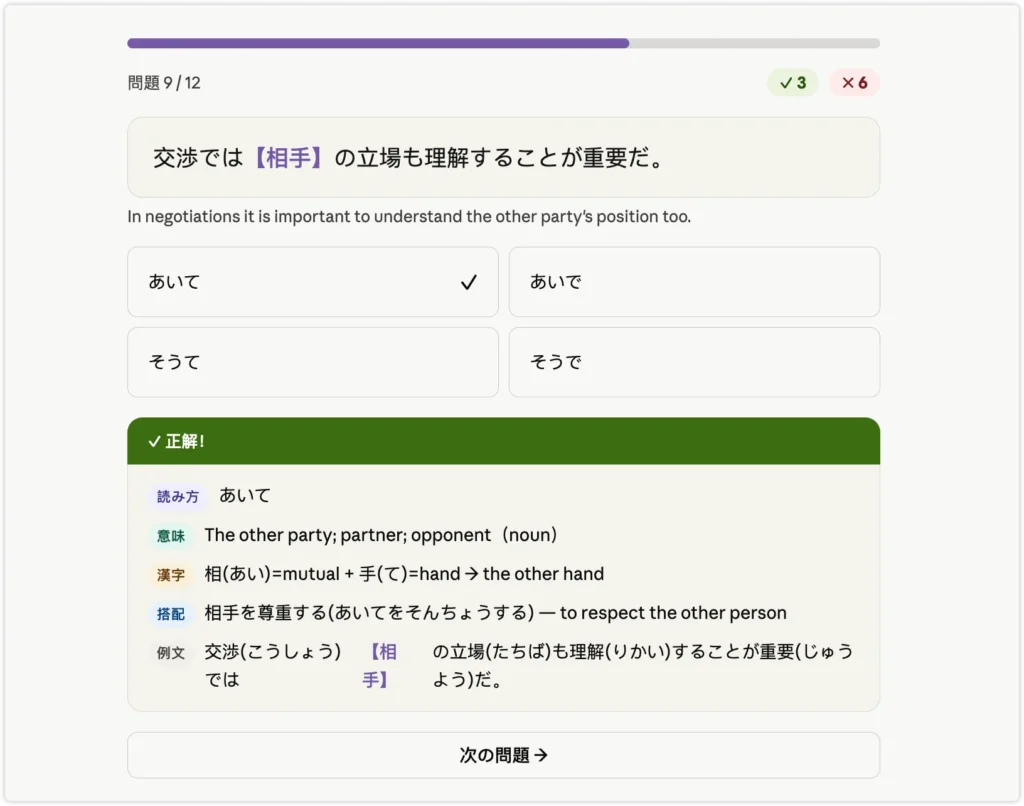
Build me an interactive vocabulary quiz as a styled HTML page.

Language: Japanese (delete if Korean)

Design: progress bar at top, score badges top right (green ✓ / red ✗), question sentence in a gray card with target word in 【】highlighted in purple, English translation below, 4 answer options in a 2x2 grid. When answered: wrong option turns red with ✗, correct option turns green with ✓. Feedback box below with colored header (green if correct, red if incorrect) and tagged rows for:
- Reading (hiragana for Japanese / romanization for Korean)
- Meaning in English + part of speech
- Kanji breakdown (Japanese) / Etymology — 한자어 / 고유어 / 외래어 (Korean)
- One key collocation with reading in parentheses and English translation
- The question sentence again with readings added for all words except the target word

Question sentences should be clean with no readings. Track score and show progress.

Words: [paste your list here]
Prompt 6: Build a quiz with no word list — Claude picks the words
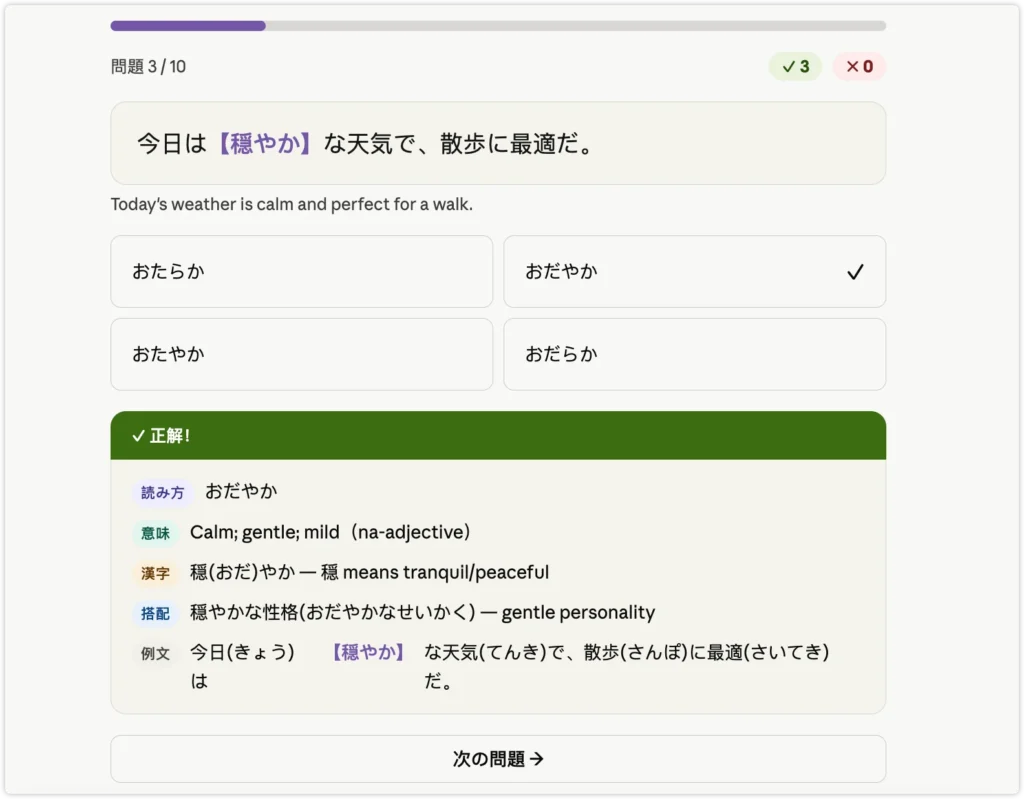
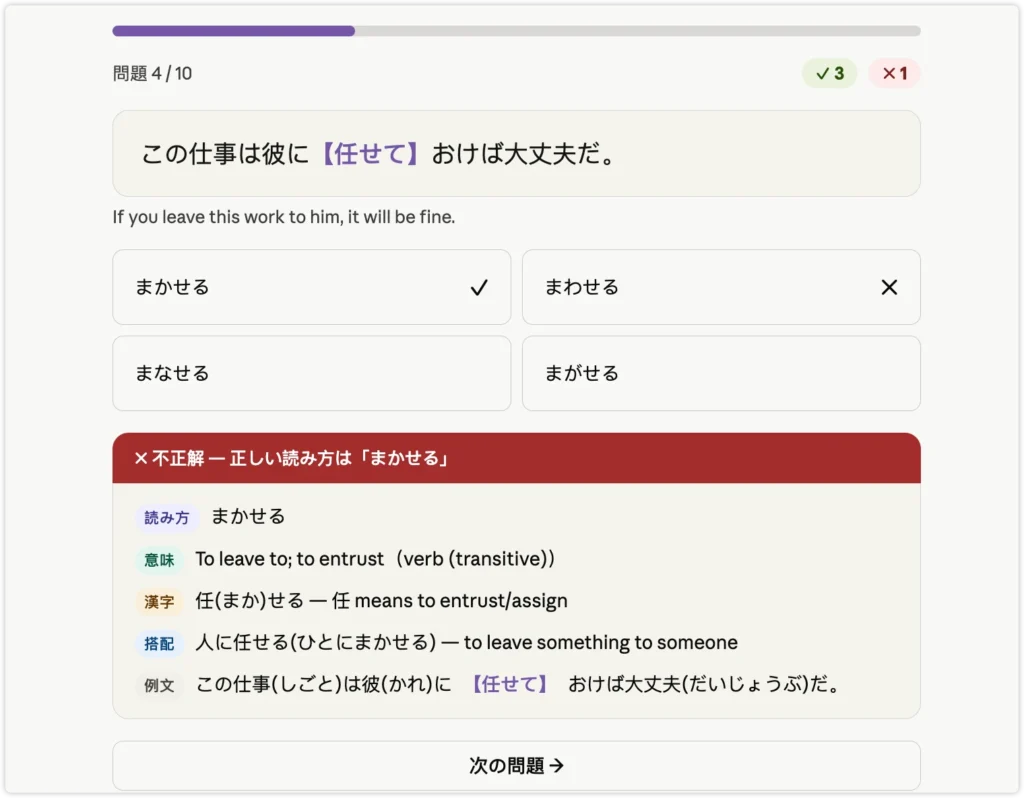
Best for: Learners who want to test themselves right now without preparing anything
Use this when: You just want to drill a level and let Claude choose the vocabulary
Build me an interactive vocabulary quiz as a styled HTML page.

Language: Japanese
Level: JLPT N3
Questions: 10

Design: progress bar at top, score badges top right (green ✓ / red ✗), question sentence in a gray card with target word in 【】highlighted in purple, English translation below, 4 answer options in a 2x2 grid. When answered: wrong option turns red with ✗, correct option turns green with ✓. Feedback box below with colored header (green if correct, red if incorrect) and tagged rows for:
- Reading (hiragana for Japanese / romanization for Korean)
- Meaning in English + part of speech
- Kanji breakdown (Japanese) / Etymology — 한자어 / 고유어 / 외래어 (Korean)
- One key collocation with reading in parentheses and English translation
- The question sentence again with readings added for all words except the target word

Question sentences should be clean with no readings. Track score and show progress. Choose the words yourself.
Change Japanese to Korean, JLPT N3 to your level (N5 / N4 / N2 / N1), or swap to TOPIK Beginner / Intermediate / Advanced.
Quizlet, Knowt, Anki, and NotebookLM: Which Free Study Tool Works Best for Language Learners?
Traditional flashcard tools are still worth knowing about, especially for long-term review.
Quizlet has the largest shared library of existing flashcard sets. If someone has already built a deck for the vocabulary you need, you can find it and start studying immediately. The free version still lets you create sets and access basic Flashcards mode, but Learn mode — the main spaced repetition tool — is now limited to a small number of rounds per session on the free plan. Several features moved behind Quizlet Plus after 2024, which has driven significant user frustration. Quizlet Plus costs $35.99 per year ($2.99/month) billed annually, or $7.99 per month on a rolling plan. AI features like Q-Chat and Magic Notes require Plus.
Knowt was built specifically as a free Quizlet alternative, and the free plan is genuinely generous. It includes unlimited flashcard creation, AI generation from notes and PDFs with monthly limits, spaced repetition, a fill-in-the-blank typing mode, a matching game, and text-to-speech. In testing, the Japanese text-to-speech was noticeably natural. Unlike Quizlet, Knowt keeps AI flashcard generation free — the paid Premium plan ($5/month or $35/year) mainly adds advanced analytics and priority features. The free experience does include ads, and some users report that limits on AI features can be hit during heavy study sessions.
Anki is the gold standard for spaced repetition. It tracks exactly which cards you have mastered and schedules reviews at the optimal time. The desktop app (Windows, Mac, Linux) and the Android app (AnkiDroid) are both free. The iOS app, AnkiMobile, is a one-time purchase of $24.99 in the US App Store — prices vary by region. AnkiWeb sync is free across all platforms. Anki’s interface has a steep learning curve compared to the other tools here, but for long-term vocabulary retention over months and years, the algorithm is unmatched.
NotebookLM takes a different approach. Upload a Japanese or Korean article, and it automatically extracts vocabulary and generates flashcards from the content. You can tap Explain on any card to get an instant in-context breakdown of the word in the original article. There is no audio playback and no spaced repetition scheduling, but for learners who read authentic content regularly, the automatic extraction saves significant time.
| Tool | Best For | Pros | Watch Out |
|---|---|---|---|
| Gemini ⭐⭐⭐⭐⭐ | Making flashcards fast | Memory hooks, readings, quiz, matching game | 18+ only; availability varies by region |
| ChatGPT ⭐⭐⭐⭐ | Importing cards into Anki or Quizlet | Clean TSV output, flexible format | No flashcard UI |
| Claude ⭐⭐⭐⭐ | Custom quizzes with explanations | Kanji breakdown, fully customizable | Best for quizzes, not flashcards |
| NotebookLM ⭐⭐⭐⭐ | Extracting flashcards from articles | Source-based cards, in-context breakdowns | No SRS scheduling |
| Knowt ⭐⭐⭐⭐ | Studying with more free modes | SRS, fill-in-blank, AI card generation free | Free AI has monthly limits; ads on free plan |
| Quizlet ⭐⭐⭐ | Finding existing decks | Huge shared library | Learn mode capped on free; Plus from $35.99/yr |
| Anki ⭐⭐⭐⭐⭐ | Long-term spaced repetition | Best SRS algorithm, free on desktop + Android | iOS app $24.99 one-time; steep learning curve |
Tool features and free tier limits can change — check each tool’s current plan before committing to a workflow.
What AI Flashcards Still Get Wrong
AI flashcard generation is fast, but it is not perfect — and knowing the limitations matters for language learning specifically.
A few things to watch for:
- Unnatural example sentences. AI may write sentences that are grammatically correct but sound stiff or unusual to native speakers.
- Wrong speech level in Korean. AI may use casual speech when formal would be more appropriate, or vice versa.
- Incorrect readings for rare kanji. Less common characters sometimes get the wrong hiragana reading.
- No memory across sessions. AI does not know which words you have already learned. Every new session starts from scratch.
- No pronunciation feedback. AI cannot tell you whether your spoken output sounds natural or whether you are using the right register for the situation.
The first three problems — unnatural sentences, wrong speech level, incorrect readings — are easy to miss when you are studying alone. You memorize the card, you think you know the word, and then a native speaker looks confused when you use it.
That is the gap AI cannot close on its own. What actually helps is sending two or three cards you are unsure about to a tutor and asking: “Does this sentence sound natural? Would a Korean person actually say this?” A 30-minute session with a native speaker on italki catches more errors than a week of solo review. You do not need a regular teacher or a commitment — you can book a single community tutor session, show them your Gemini cards, and get honest feedback on the ones that feel off. New users get $10 in credits on their first purchase, which is usually enough for one or two sessions.
My Recommended Workflow
This is the process I use for Japanese and Korean vocabulary from real content.
I read NHK News and Japanese entertainment articles with Immersive Translate running in the background. By the end of one article I usually have 10 to 15 words worth studying, collected without breaking the reading flow.
Once I have a list, I paste it into Gemini with Prompt 2 above. The deck is ready in under a minute — readings, memory hooks, and example sentences for every word.
I study the new deck in Gemini’s Canvas panel for the first pass. For words I want to keep reviewing over the following weeks, I use Prompt 5 to get a tab-separated list from ChatGPT and copy it into Anki.
For idioms and set phrases I encounter along the way, I find it helps to have a reference. The Japanese idioms collection is a useful place to cross-check whether a phrase is common or rare before spending time on it.
Free Quizlet Alternative FAQs
What is the best free Quizlet alternative?
It depends on what you need. For making flashcards from your own word list with readings and memory hooks, Gemini is the fastest free option — no extra app required. For long-term spaced repetition, Anki is the most reliable free tool on desktop and Android (iOS is $24.99 one-time). For a browser-based experience with generous free features including AI card generation from notes and PDFs, Knowt is worth trying — its free plan does more than Quizlet’s without requiring payment.
Can Gemini make flashcards for free?
Yes. According to Google’s official Help Center, quizzes, flashcards, and study guides in Gemini are available on the free tier to users 18 and older. You need a Google account. The feature generates interactive cards in the Canvas panel with text-to-speech, shuffle mode, and progress tracking. Guided Learning (step-by-step explanations) is available to all ages. If you use a work or school Google account, some sharing features may not be available.
Can ChatGPT make flashcards?
ChatGPT can generate flashcard content in any format, including tab-separated text you can import directly into Quizlet or Anki. It does not have a native interactive flashcard interface like Gemini. Ask it to output your cards as a tab-separated list and paste the result into whichever study app you prefer.
Can I use AI flashcards for Japanese and Korean?
Yes, and AI has a specific advantage for these languages. It can add hiragana readings, romanization, and example sentences automatically — which Quizlet’s free version does not do. For Korean, you can specify the speech level in the prompt. The main limitation is that AI may occasionally miss the correct register or produce unnatural example sentences, so it helps to verify new vocabulary with a native speaker or tutor.
Do I need to download an app?
No. Gemini, ChatGPT, Quizlet, and Knowt all work in a browser. Anki is the one exception and requires a desktop download. If you want a fully browser-based workflow with no installations, Gemini is the most capable free option for language learners.
The slowest part of flashcard study is making the cards. If your vocabulary comes from dramas, news articles, or your own notes, the prompts above can turn that list into a full deck in under a minute.
Start with Prompt 2 for Japanese or Prompt 1 for Korean — paste your first word list into Gemini right now and see how it comes out. Once you have a deck you want to keep, move it into Anki for long-term review.
The gap AI cannot close is the moment you try to actually use the words out loud. You can memorize every card and still freeze when a native speaker talks to you — because flashcards train recognition, not production. When you are ready to use what you have been studying, one conversation session on italki with a community tutor moves you further than another week of card review. No subscription, no commitment — book a single session, bring your word list, and see which ones you can actually use in a sentence. New users get $10 in credits on their first purchase.