I have been self-studying Japanese for two years while working in the AI industry. That combination means I test these tools differently — not just whether they feel useful, but whether the output is actually accurate enough to learn from.
Most of what I know about using AI for language learning comes from applying it to real Japanese content every week — NHK articles, videos, entertainment, things I genuinely want to understand.
This is not a list of apps I tested over a weekend. It is the study system I actually use.
Key Takeaways
- There is no single best AI for learning Japanese. What works better is combining real Japanese input, AI for explanation and practice, and a personal system for saving what matters.
- ChatGPT and Claude are useful, but they are not reliable grammar authorities. They work best when you give them real sentences to analyze, then verify anything that seems uncertain before adding it to your notes.
- The biggest improvement comes from changing how you study, not from finding another app. Build your AI workflow around Japanese content you genuinely want to understand, and use each tool for a specific job.
Quick Answer: Best AI for Learning Japanese
| Tool | Best for | I use it for | I don’t use it for |
|---|---|---|---|
| Claude | Sentence breakdowns | Long sentence analysis, grammar questions | Pitch accent, cultural nuance |
| ChatGPT | Writing correction | Output practice, TSV flashcard export | Grammar authority |
| Gemini | Flashcards + quizzes | Paste word list → instant deck | Deep nuance explanation |
| NHK + AI | Reading and vocabulary | Daily input workflow | Speaking practice |
| Notion + AI | Building a study system | Notes, vocabulary database, article log | Spaced repetition |
| Duolingo Max | Habit building | 5-min morning warm-up | Main study |
My pick: There is no single best AI Japanese tutor. The most effective setup I have found is real Japanese input + Claude or ChatGPT for processing + a personal note system for long-term retention. Most days I use only two tools: one source of real Japanese and one AI tool.
Not All “AI for Learning Japanese” Is the Same
Before recommending anything, let us clear up a confusion that wastes a lot of beginners’ time.
There are three completely different things people call “AI for learning Japanese”:
General AI (ChatGPT, Claude) — Large language models you can chat with. Excellent for certain tasks. Risky for others. More on this below.
AI-powered apps (Duolingo Max, Speak, Langua) — Apps that use AI under the hood to personalize lessons, give speaking feedback, or generate practice content. Vary wildly in quality.
Your own AI-powered system — Building a personal study setup where AI assists your reading, note-taking, and review. This is the least talked about category and, in my experience, the most effective long-term.
Most people only try the first two. They download Duolingo, try ChatGPT for a week, feel confused about why they are not improving, and give up. The missing piece is usually the third.
The ChatGPT Problem Nobody Talks About
Let me say something that might surprise you coming from someone who works in AI: you should not use ChatGPT as your primary Japanese grammar resource.
This is not a dig at OpenAI. General AI models can produce explanations that sound completely convincing even when the underlying grammar analysis is wrong. That is especially risky for beginners, because you often do not know enough Japanese yet to spot the mistake.
Japanese learners regularly warn about relying on AI grammar explanations without verification — and from my own experience, I have seen Claude and ChatGPT both explain particle usage in ways that sounded authoritative but were subtly off.
One AI Mistake That Changed How I Study
Early in my self-study, I asked Claude to explain the difference between に and で as location markers. The explanation it gave was clean, confident, and structured with examples. I saved it and studied from it for two weeks.
Later, when I compared it against a Japanese grammar reference and an actual native speaker’s explanation, I noticed the AI had drawn the distinction slightly too neatly — real usage is messier, and the rule it gave me didn’t hold in several common cases I later encountered in NHK articles.
What I do now: I only ask AI to explain sentences I have already encountered in real Japanese. I never ask it to teach me grammar rules from scratch. When something feels off, I check it against Jisho or a grammar dictionary before saving it to my notes.
That one mistake saved me from a much bigger habit: trusting AI explanations before I had enough Japanese to evaluate them.
So what should you use ChatGPT and Claude for?
Used correctly, they are genuinely powerful. The key is using them as a thinking partner, not as a textbook. Here is what actually works:
Generating practice sentences in a specific style. Try this prompt: “I am studying for JLPT N3. Write me five short sentences using [grammar point], in the style of NHK Easy News. Keep vocabulary at N4 level.” This gives you targeted, level-appropriate input that you can then verify against trusted sources. If you are still shaky on core grammar forms like the te form, get that foundation solid first — I have a full te form guide with conjugation chart and practice PDF that covers everything in one place.
Turning your NHK vocabulary into flashcards and quizzes. Once you have collected new words from an article, paste the list into Gemini or ChatGPT and get a full deck with readings, example sentences, and memory hooks in under a minute — no extra app needed. I covered the exact prompts I use in my free Quizlet alternative guide, including a Claude prompt that builds an interactive HTML quiz from any word list.
Explaining something you already encountered in real Japanese. If you find a sentence in an actual NHK article or book that confuses you, paste it in and ask for a breakdown. Giving it a specific sentence from a real source usually produces a much more useful explanation than asking it to generate grammar rules from scratch. I still verify anything that looks unusual.
Correcting your own writing. Write a short paragraph in Japanese, then ask: “Please correct any grammar or natural expression issues. Explain each correction in one sentence.” This works well because you are giving the AI something to react to rather than asking it to produce grammar rules.
The rule of thumb: use AI to process real Japanese input, not to generate grammar theory.
My AI + NHK Japanese Learning Workflow
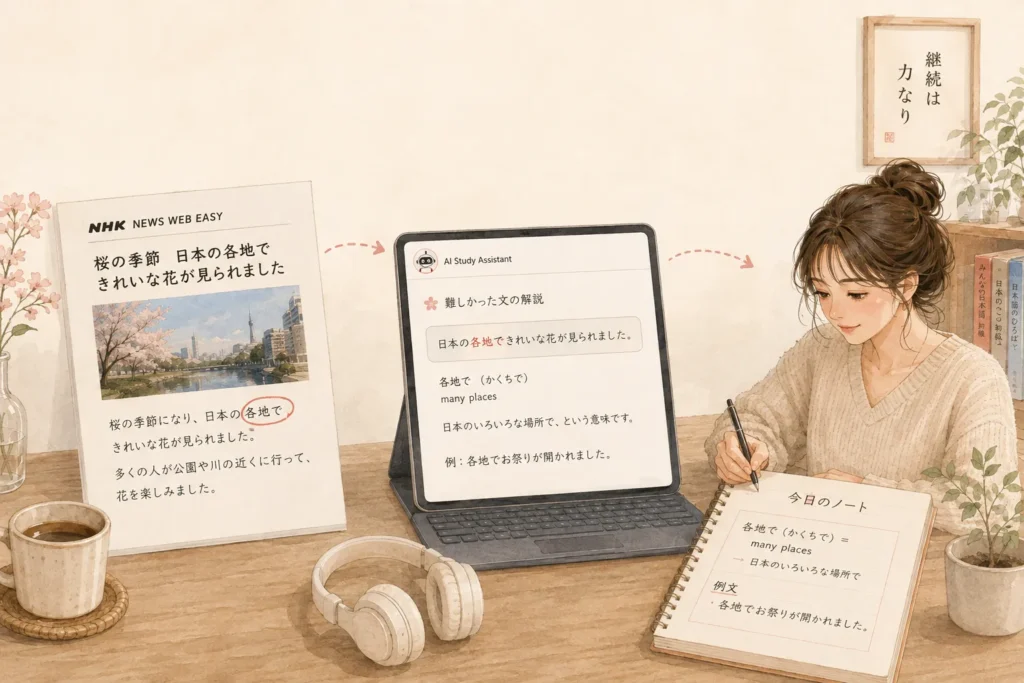
This is the core of my study routine and the single biggest reason my reading has improved.
NHK Easy News (now officially NHK やさしいことばニュース) publishes three to five short news articles every weekday, written in simplified Japanese with furigana on every kanji. The content is real news, not textbook scenarios about going to the supermarket. The language is natural. The articles are free.
Here is the exact workflow I follow:
Step 1: Read the article once without any help. Mark anything you do not understand. Do not look things up yet. Let your brain work.
Step 2: Read again and collect vocabulary. Pull out words you did not know and phrases that felt unfamiliar. Focus on words that appeared more than once, or that felt essential to understanding the article.
Step 3: Ask Claude to break down difficult sentences. I copy the specific sentence — not the whole article — and ask: “Please explain the grammar structure of this sentence and any vocabulary that might be tricky for an N3 learner.” Giving it a specific real sentence produces far more reliable output than asking general grammar questions. I still check anything that seems off.
Step 4: Write notes in Notion. This is where the learning actually sticks. More on this in the next section.
Why does this work better than an app? Because you are learning Japanese that Japanese people actually use to talk about real things. Your brain builds connections between words and meaning rather than between words and game mechanics.
A Real Example From My Study Notes
Here’s what a single NHK article actually produces in my workflow. This one was about earthquake safety instructions.
NHK original sentence:
このあとも大きい地震が来るかもしれません。
What I didn’t understand at first:
- ~かもしれません — may / might, and how it differs from ~でしょう
- 揺れるのが止まるまで — “until the shaking stops”; why の appears after 揺れる
What I asked ChatGPT:
Please explain the grammar in 揺れるのが止まるまで for an N3 learner.
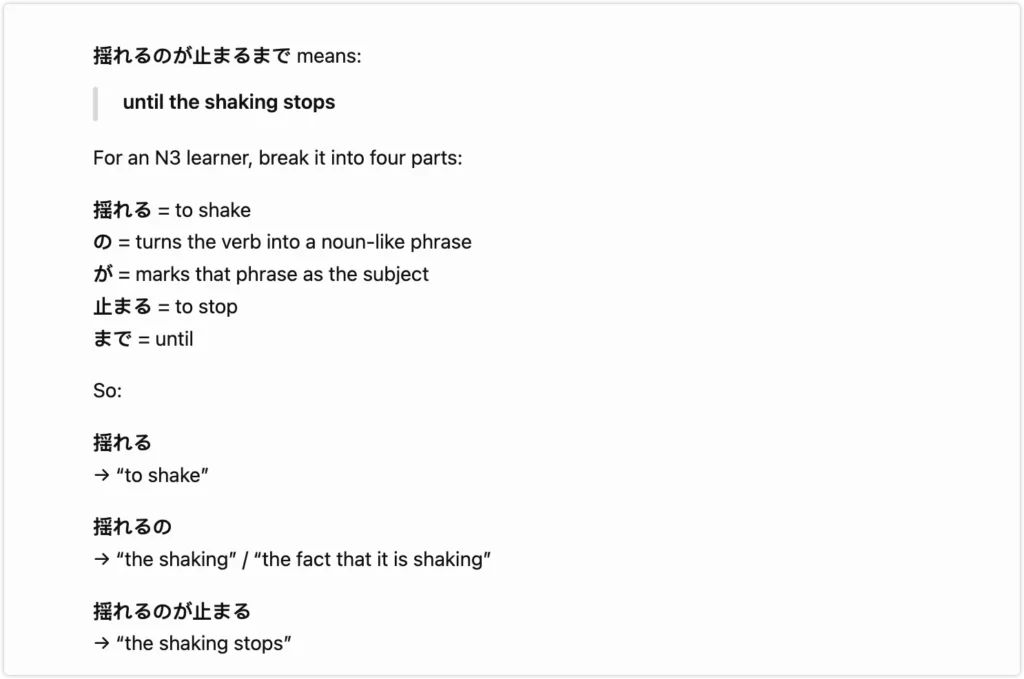
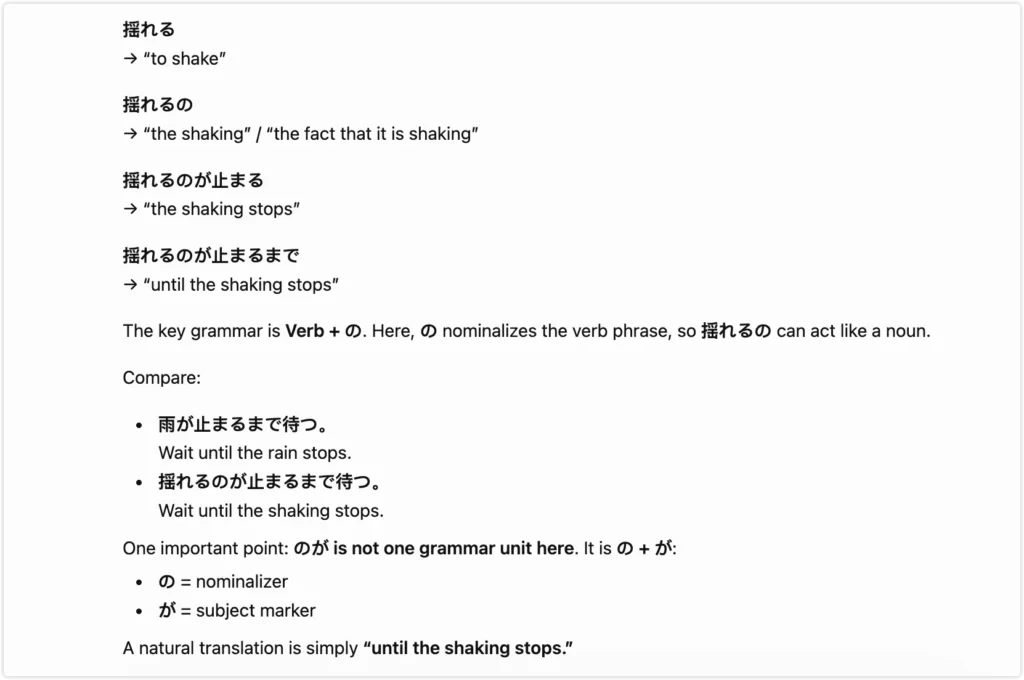
What I actually saved in Notion:
I originally collected eight words from this article. A week later, I kept only three.
That changed how I approach every article now: I save fewer words, but keep the sentence, context, and reason I wanted to learn each one.
How I Turn Real Japanese Into Notion Notes
Everyone recommends spaced repetition flashcard apps. I tried them. I found something that works better for me, and I think it will work better for a lot of people who are also content creators or note-takers by nature.
I build everything in Notion.
My Japanese study workspace has a few core sections:
Vocabulary database. Each word gets its own entry: the Japanese, reading, meaning, an example sentence from the actual article where I encountered it, and a note about what made it interesting or tricky. Because I wrote the entry myself, I remember it better than a card I swiped past.
Grammar notes. When I encounter a grammar pattern I want to master, I write a short explanation in my own words and collect three to five example sentences from real sources. Writing the explanation forces me to actually understand it.
Article log. A simple list of every NHK article I have studied, with a one-line summary and the date. Seeing the log grow is surprisingly motivating.
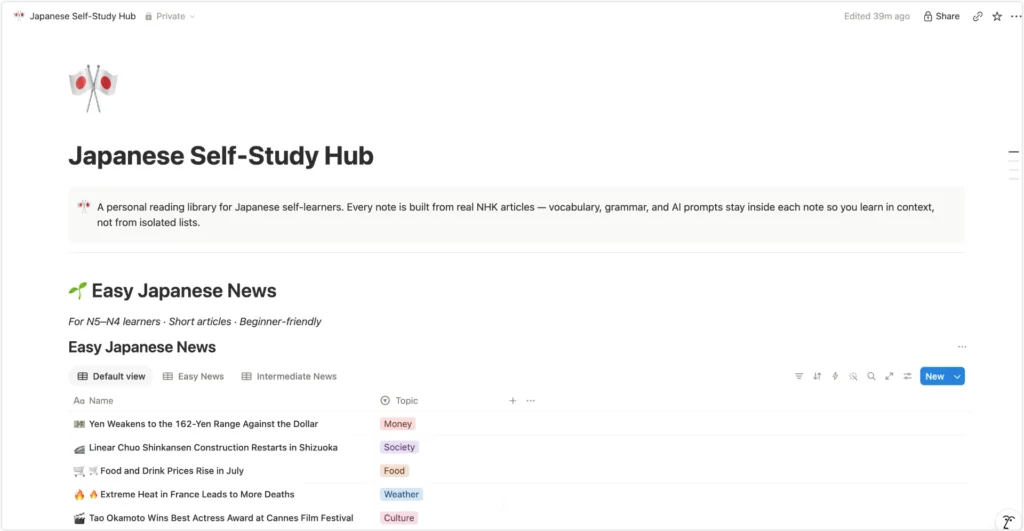
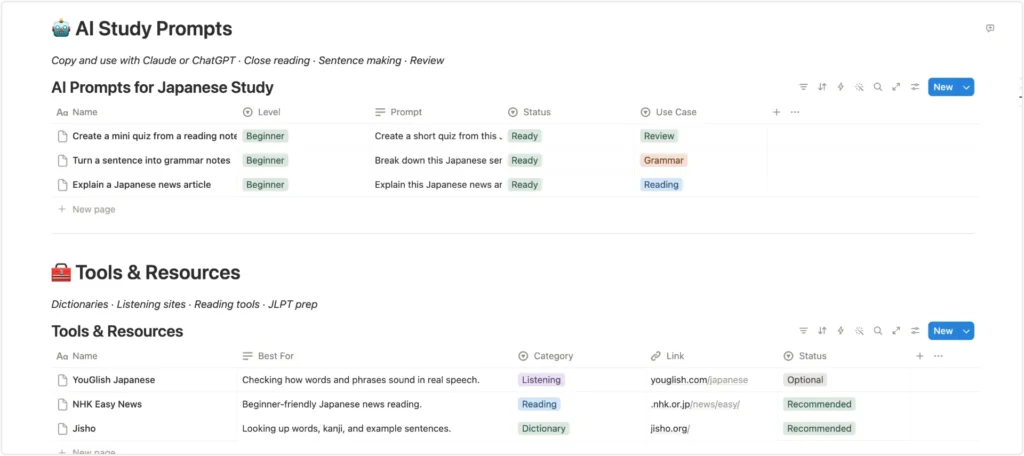
The biggest advantage: everything connects. When I look up a word in my vocabulary database, I can see the article where I found it. When I review a grammar note, I remember the context. Flashcard apps drill you on isolated items. A connected Notion system builds a mental map.
My 3-Rule Vocabulary Filter
I used to save every unknown word. The result was a vocabulary database with hundreds of entries I never reviewed and couldn’t remember in context.
Now I only save a word if it meets at least one of these three conditions:
- I have seen it more than once — in different articles or contexts.
- It changes my understanding of the sentence — without it, I would misread the meaning.
- I can imagine myself using it — it fits the kind of Japanese I want to speak or write.
Everything else I let go. A word I encounter once and never need again is not worth the mental space.
This filter cut my vocabulary entries by about half — and made every entry I kept feel genuinely worth reviewing.
I use Notion because it fits my existing workflow as a content creator. If you prefer a more offline, link-based system, Obsidian works on the same principle — and it has a Japanese plugin that adds furigana (reading aids) directly above kanji, which Notion does not support natively. The core idea is the same either way: AI does the sorting, you do the reading and speaking, your notes do the remembering.
Where Duolingo Max Fits
Duolingo Max has improved significantly. The speaking side in particular — the AI conversation features in the Max tier are genuinely better than what apps like this offered a few years ago, and Japanese now has Video Call practice support.
That said, for me personally, Duolingo became much less useful once I moved beyond the absolute beginner stage. The sentences are artificial. The vocabulary selection prioritizes what is easy to gamify over what is actually frequent in real Japanese.
If you are starting from zero, I would use it mainly as a short-term habit builder rather than the center of your study plan. Build the daily habit, get hiragana and katakana solid, then shift to real input methods. Pair it with a solid kanji reference — my N5 kanji list covers all 112 beginner kanji with a free PDF you can save.
I still open Duolingo for five minutes in the morning. But it is a warm-up, not a meal.
Where I Still Would Not Rely on AI
Pitch accent. Japanese is a pitch-accent language, meaning the melody of a word changes its meaning. I would not rely on general AI tools to teach this — several will give you patterns that sound plausible but are not accurate. For pitch accent, the Dogen YouTube channel combined with consistent listening to native audio is the better path.
Cultural nuance and register. Keigo — the formal speech system used in business and with strangers — requires understanding social context that AI handles inconsistently. For anything involving formality, I supplement AI with human feedback. One session per month on italki with a native speaker does more for register awareness than hours of chatbot practice.
Making you actually speak. No AI tool will force you to produce Japanese under pressure. The “can read, cannot speak” trap exists because reading and listening are passive. You need to speak, even badly, even alone, out loud. Shadowing audio from NHK or content you enjoy is the lowest-friction way to start. Anime is a great entry point for listening — but not every phrase you hear is safe to copy in real life. I broke down which Japanese anime phrases you can actually use and which ones to avoid.
My Current Japanese Learning Stack
Here is everything I actually use, in order of how much time I spend with each:
Claude — Grammar questions, sentence breakdowns, generating level-appropriate practice sentences. Daily.
NHK Easy News — Primary reading input. Three to five articles per week minimum.
Notion — All vocabulary, grammar notes, and article logs live here. The backbone of the whole system. (If you prefer offline and want native furigana support, Obsidian is a strong alternative.)
Duolingo — Five minutes in the morning. Habit maintenance only.
Japanese content I actually enjoy — This is the part most study guides skip. Listening to content you genuinely love is how you build listening intuition over hundreds of hours without burning out. I have learned more natural Japanese expressions this way than from any structured resource.
Total daily time: thirty to forty-five minutes of focused study. The entertainment listening does not feel like studying.
What This Looks Like in a Real Week
My stack looks bigger on paper than it feels in practice. On most days I use only two things: one source of real Japanese and one AI tool.
| Day | What I actually do |
|---|---|
| Monday | NHK article + 3–5 vocabulary notes in Notion |
| Tuesday | Review Monday’s words + write 3 sentences using them |
| Wednesday | Japanese content I enjoy — drama, music, podcast |
| Thursday | NHK article + one grammar point noted |
| Friday | Ask Claude to quiz me on the week’s vocabulary |
| Weekend | Entertainment listening — no pressure, no notes |
I do not do all five tools every day. Most weeks look messier than this. But the core never changes: real Japanese in, AI processing it, notes keeping it.
Best AI for Learning Japanese FAQs
Is ChatGPT accurate for Japanese grammar?
For simple, common grammar points, usually yes. For anything involving nuance, particles, or pitch accent, it can produce confident-sounding explanations that are subtly wrong. Use it to process real Japanese input, not as a grammar textbook, and verify anything that looks unusual.
What is the best free AI for Japanese practice?
Claude and ChatGPT are both free at a basic tier and both useful for the prompt-based methods described above. For making flashcards and quizzes from your vocabulary list, Gemini is currently the fastest free option — it generates an interactive deck with readings and memory hooks directly in the browser. I have the exact prompts in my free Quizlet alternative guide. For conversation practice specifically, Speak and Langua have free trials worth testing.
Can AI help me pass the JLPT N3?
AI can help you build vocabulary, understand grammar patterns, and process reading practice. It cannot replace structured study of the official test format. Use the JLPT official practice tests alongside AI-assisted input study.
Is Duolingo Max worth it for serious learners?
It depends on your stage. For absolute beginners, the habit structure and improved AI speaking features are genuinely useful. For intermediate learners, the depth is not there. It works best as a warm-up tool alongside real input practice.
Do I need a human tutor if I use AI?
For reading and vocabulary, AI is sufficient if used carefully. For speaking confidence and cultural register, one italki session per month with a native speaker will do more than any AI tool.
Free: 10 AI Prompts I Actually Use to Learn Japanese
If you want to try the AI-assisted workflow described in this article, here are the ten prompts I actually use every week:
- Sentence breakdown — “Explain the grammar structure of this sentence for an N3 learner: [sentence]” I use this only after trying to understand the sentence myself first.
- Vocabulary extraction — “Pull out the 5 most useful words from this NHK article and give me an example sentence for each: [article]” I usually keep 3–5 words from the AI’s suggestions, not everything it pulls.
- Naturalness check — “Does this Japanese sentence sound natural? How would a native speaker say it? [sentence]”
- Writing correction — “Correct this Japanese paragraph. Explain each correction in one sentence: [paragraph]”
- JLPT-level rewrite — “Rewrite this sentence at N4 level. Keep the same meaning: [sentence]”
- Shadowing script — “Write a 5-sentence NHK Easy News style paragraph about [topic] at N3 level for shadowing practice”
- Active vocabulary — “Give me 3 natural example sentences using [word] in different contexts”
- Grammar comparison — “What is the difference between [grammar A] and [grammar B]? Give me two example sentences for each” I verify these against a grammar reference before saving them.
- Quiz me — “Quiz me on 5 vocabulary words from this list. Give me the English, I will give you the Japanese: [list]”
- Notion note generator — “Turn this NHK article into a study note with: bilingual reading, 5 key vocabulary entries, and 2 grammar points explained simply: [article]”
→ N5 Kanji List + Free PDF — The kanji foundation reference I use alongside this workflow.